

When a small contractor business starts organizing its team’s documents, the first question is usually simple: where should we start?
There are employees to create, teammates to invite, document requirements to define and files to prepare for the work ahead. If the first session is spent looking for buttons or guessing what comes next, the tool adds work before it removes any.
What are cebric’s First Steps?
First Steps is an interactive guide inside cebric that helps you configure your organization and get your team ready to work. It lays out a practical route for creating employees, organizing document requirements and trying a first expense report.
The goal is not to learn the whole system before using it. It is to see what is missing, move through the setup in order and leave a useful base for real operations.
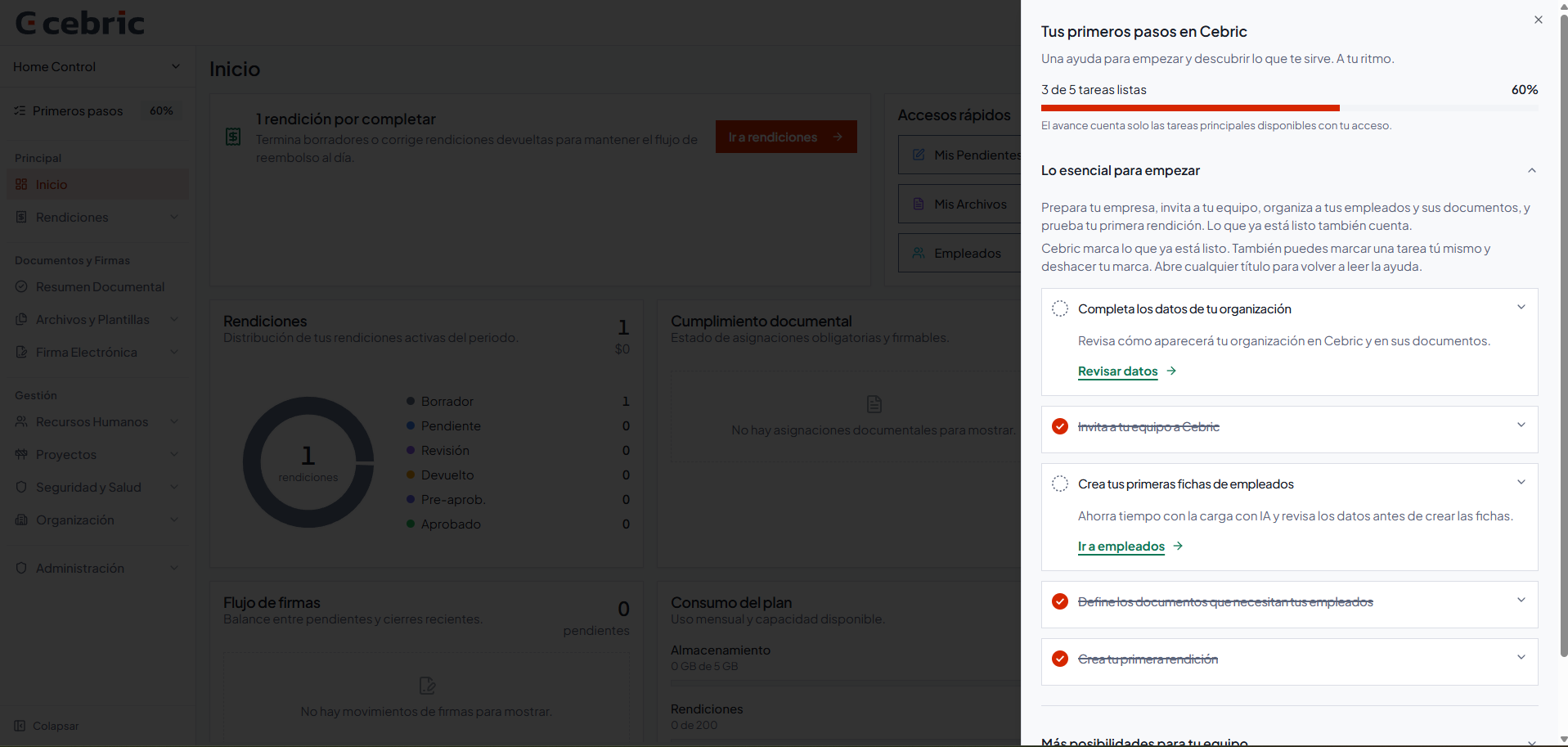
This screenshot shows a real version of the guide with demonstration data. The names, amounts and visible statuses are fictional; the interface may change as new features are added.
Five steps to get your operation started
The guide presents five tasks. Four connect directly with the work most teams need to organize at the beginning: completing organization details, inviting users, creating employees and generating document requirements. The fifth lets you try a first expense report and understand the complete flow. Working with templates is a useful next step once the initial setup is complete.
1. Complete your organization details
Start by reviewing the information your team will use in cebric. Keeping these details clear from the beginning helps reduce repeated corrections when you prepare records or documents.
2. Invite other users
Document work does not have to depend on one person. Invite the person who coordinates a project, manages people or reviews pending items before a folder is sent.
Before sending invitations, decide what role each person will have and what information they need to access. The guide supports collaboration, but it does not replace your internal permissions policy.
3. Create your employees
Keeping worker information in one place makes it easier to connect their records with the operation you manage. It also reduces the need to maintain a separate list and copy the same data into different files.
Start with a small group and review the information before expanding to more workers or projects. Automation can reduce repetitive work, but the data still needs human review.
4. Generate document requirements
Once employees are created, define the documents you need to request and review. Instead of asking what is missing every time, you can establish a requirement that fits your operation.
Requirements are not the same for every project. They may change according to the activity, the client or the folder you need to present. First Steps helps organize the workflow; it does not decide what each client requires or guarantee that a folder will be approved.
5. Try a first expense report
The route also includes a first expense report. Testing a small case helps the team understand how to record information before applying the process across the company.
For teams working in the field, this connects document setup with another everyday task: keeping receipts, organizing expenses and making it clear who reviews each pending item.
After the guide: create documents from your templates
Completing First Steps gives you a base for continuing the work. Many companies already use familiar formats such as contracts, amendments, meeting records or internal forms. They should not have to design everything again.
With Word templates in cebric, you can work from existing formats and fill in information already stored in the system. Depending on your account configuration and available features, you can also continue with mass document generation.
The practical benefit is a clearer path between a person’s data, a project’s requirement and the document you need to prepare. Less copying and pasting also means fewer opportunities to carry an old value into a new file.
Why does this order help a small contractor business?
Because the first session stops being an open-ended exploration. You can start with the organization, add the team, register employees and define the documents that repeat in your operation.
That order also makes internal conversations easier: what is ready, what is missing and who owns the next step. Information does not remain tied to one inbox or a spreadsheet that only one person knows how to update.
The guide does not replace the judgment of the person managing the process. It turns the beginning into a visible sequence that is easier to resume.
Does the guide automatically define the documents a project requires?
No. First Steps helps you create and organize document requirements inside cebric, but each company must validate what applies to a specific project, activity and client.
That distinction matters: organizing a digital workflow is not the same as obtaining approval for a folder, and it does not replace a review of applicable obligations.
How should you begin?
Do not try to solve the whole operation in one session. A practical starting sequence is:
- Complete your organization details.
- Invite the person who will participate in the review.
- Create a small group of employees.
- Define a document requirement you use frequently.
- Try a first expense report and prepare a template for the next step.
This lets you walk through the complete flow, identify missing information and decide what to extend to more workers or projects.
First Steps does not remove the responsibility to review documents. It does make the first action easier to find.
References
- Document control for workers and projects — product context for organizing people, documents and projects.
- Word templates — working from existing formats and stored variables.
- Mass document generation — reference for creating customized documents from a template.
- Screenshot provided by the cebric team — real First Steps guide with demonstration data, version available on September 21, 2026.
Ready to give cebric a try?
Start today at no cost and see how it works for your company.
Related Articles
View all articles
Notifications: which documents and PPE are coming due?
Choose who receives cebric email summaries for expired or expiring documents and PPE, set the delivery days and time, and open each record from a direct link.
Read article →

cebric: less paperwork for teams working in the field
Meet cebric, the Chilean platform for worker and project documents, signatures, PPE records and mobile expense reports without going back to paper.
Read article →